Automation · Airbnb · Comparisons
The best Airbnb automation tools: what to automate and with what
Every trigger in a stay, from booking to review, and the best tool to automate each one: messages, pricing, door codes, turnovers, tasks, upsells and reviews. Plus the automations that should always keep a person in the loop.
 Bill UlammandakhCEO & Co-Founder at ProhostAI, former Staff Data Scientist on Airbnb's hosting team8 min read
The best Airbnb automation tools handle the work that repeats on every stay: guest messages, pricing, door codes, turnovers, review requests and the tasks guests report. Airbnb's own scheduled messages cover the basics for one listing. Past that, you need tools that react to events (a booking, a checkout, a guest saying "the heater is broken") and do the next step without you. This guide lists what to automate, the best tool for each, and the automations we see working best across thousands of listings.
We make ProhostAI, which is one of the tools here. We've tried to describe each tool fairly and to say who it's best for, including the cases where a simpler or different tool wins. Pricing was checked on vendor sites in November 2026.
Key takeaways
- Automate by trigger, not by tool. List the events in a stay (booking, 3 days before arrival, check-in, checkout, review window) and decide what should happen at each.
- Scheduled messages are the starting point, not the finish line. They send the same text every time. AI messaging answers the questions guests actually ask in between.
- The automations that pay the most are the ones people skip by hand: dynamic pricing, review requests on every stay, and upsell links in automated messages. Hosts who put the upsell link in automated messages earn about 6× more per listing from upsells than hosts who don't (our upsell study).
- Keep a person on anything irreversible or sensitive: refunds, damage claims, cancellations and bad-review disputes.
- Fewer connected tools beat many disconnected ones. Every Zapier step you add is one more thing to break.
What to automate on Airbnb, and with what
| Trigger | Automation | Best tool |
|---|---|---|
| Booking confirmed | Welcome message with the guidebook and upsell link | ProhostAI, Hospitable, Airbnb scheduled messages |
| Any guest message | AI reply in your voice; escalate what it can't handle | ProhostAI, Hospitable, HostBuddy AI |
| Every night | Update nightly prices from demand | PriceLabs, Wheelhouse, Beyond |
| 3 days before arrival | Create a unique door code; send check-in instructions | ProhostAI smart devices, Hospitable |
| Guest reports a problem | Create a task and notify the right teammate | ProhostAI, Conduit |
| Checkout | Schedule and assign the turnover clean | ProhostAI, Turno, Breezeway |
| Clean finished early | Offer the next guest early check-in | ProhostAI |
| Gap night appears | Offer a discounted extra night to adjacent guests | ProhostAI, PriceLabs (orphan-night rules) |
| After checkout | Review the guest; ask for a review | ProhostAI, Hospitable |
| New review | Draft a response; turn complaints into tasks | ProhostAI |
| Anything else | Custom rules across your tools | ProhostAI AI Workflows, Zapier |
1. ProhostAI
Best for: hosts and managers with 3+ listings who want messaging, cleanings, tasks, reviews and custom automations to work from one set of events.
ProhostAI connects to Airbnb directly or through Hostaway, Guesty, Hospitable, OwnerRez, Lodgify, Smoobu or Beds24. Its automations fall into three layers:
-
AI messaging: replies to guests in your voice from your full message history, sending on its own when it's confident and asking you when it isn't. The typical customer has AI handle about 61% of guest messages (our data).
-
Built-in automations: scheduled messages on booking, check-in and checkout; cleanings scheduled from checkouts and auto-assigned; tasks created from guest messages and reviews; upsells for early check-in, late checkout and gap nights; smart lock codes; review requests and guest reviews.
-
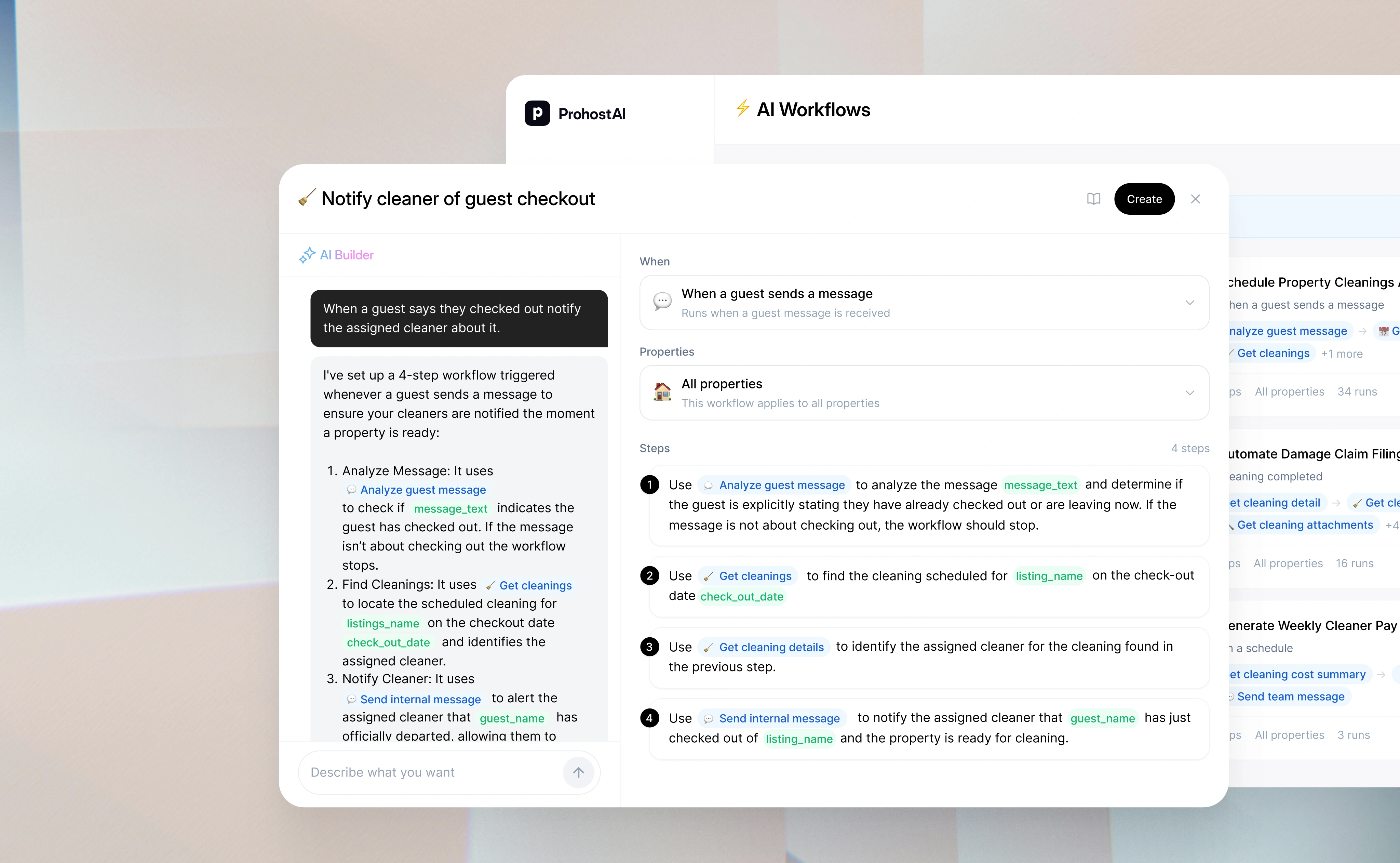
AI Workflows: your own automations written in plain language. "When a guest mentions a pet, send them the pet policy and add the pet fee." "When a cleaning is marked complete before 1 p.m., offer the arriving guest early check-in." "When a review mentions the hot tub, create a maintenance task."
-
Trade-offs: ProhostAI isn't a channel manager. If you need to sync calendars and rates across Airbnb, Vrbo and Booking.com, pair it with a PMS (it works with all the major ones).
-
Pricing: $15 per property per month on the all-in-one plan (minimum $30), with every module included. There's also a free plan. See plans.
2. Hospitable
Best for: hosts who want automation and their PMS in one product and are starting with a small or mid-size portfolio.
Hospitable is a PMS built around automated guest messaging. It sends scheduled messages, drafts AI replies, creates cleaning tasks from the calendar, includes a cleaner marketplace, automates smart locks and thermostats on the right plans, and offers a direct booking website.
- Strengths: polished and easy; a free Essentials plan to start.
- Trade-offs: AI and smart device automations are on the paid tiers, and the automations run only inside Hospitable.
How we compare: ProhostAI vs Hospitable AI.
3. Your PMS's automation rules (Hostaway, Guesty, OwnerRez)
Best for: professional managers whose PMS is already the center of their operation.
Major PMSs include automated messages, task rules and integrations. Hostaway has automated messages and a task manager; Guesty has automations, a task module and AI agents; OwnerRez is known for flexible, detailed rules for messaging and fees.
- Strengths: no extra vendor; deep reservation data.
- Trade-offs: most rules are templates triggered by dates or booking events. Their AI reply features are newer and are mostly configured rule by rule.
ProhostAI adds AI on top of each: Hostaway, Guesty, OwnerRez.
4. PriceLabs (and Wheelhouse, Beyond)
Best for: nearly every host. Pricing is the automation most hosts don't do by hand at all.
Dynamic pricing tools update your nightly rate every day from market demand, with your own minimums, maximums and rules for minimum stays, orphan nights and last-minute bookings. PriceLabs is the most widely used; Wheelhouse gives more control over strategy; Beyond is popular for a hands-off setup.
ProhostAI connects to PriceLabs and Beyond.
5. Turno
Best for: hosts whose main automation gap is cleaning: scheduling, finding and paying cleaners.
Turno creates cleaning jobs from your booking calendar, notifies your cleaners, gives them checklists, collects photos and problem reports, and handles cleaner payments. Its marketplace helps you find cleaners in new markets.
How we compare: ProhostAI vs Turno.
6. Smart locks
Best for: anyone still handing out the same door code to every guest.
A unique code per stay, created before arrival and removed after checkout, is one of the simplest automations with the biggest safety payoff. ProhostAI's smart devices create a unique code for each stay, activate it before check-in and remove it after checkout, with backup-code rules in case a lock goes offline. The same setup warms or cools the property before arrival and alerts your team when a noise sensor crosses your threshold. It works with Schlage, Yale, August, Kwikset, Nuki, igloohome and many other brands. Hospitable and most PMSs offer similar automations on their higher plans.
7. Zapier
Best for: connecting a tool that nothing else on this list supports.
Zapier connects thousands of apps with if-this-then-that steps: add each booking to a spreadsheet, post new reservations in Slack, send owners a monthly email. It's flexible, but every step is something you build and maintain, and it can't read a guest message and decide what to do.
Automations to keep a person on
Some things should never run without a person approving them:
- Refunds, discounts and cancellations. Money and policy decisions.
- Damage claims and security deposits. Evidence and tone matter.
- Anything about safety. Gas smells, injuries, break-ins. Route these to a person immediately, any time of day.
- Responses to bad reviews. Let AI draft; you publish.
Good AI tools make this easy: ProhostAI hands these to a person with the reason, rather than guessing.
How to get started
- Write down your stay timeline from booking to review, and what you do at each step.
- Turn on scheduled messages for booking, pre-arrival, check-in and checkout. Our Airbnb message templates are a good starting point.
- Add dynamic pricing.
- Add AI messaging in Suggestions mode, approve drafts for a week, then turn on Autopilot.
- Automate cleanings and tasks from checkouts and guest reports.
- Add review requests and upsell links to your automated messages.
Frequently asked questions
What can I automate on Airbnb?
Guest messages, nightly pricing, door codes, cleaning schedules, maintenance tasks, upsell offers, review requests and guest reviews. Airbnb's own tools cover scheduled messages and quick replies; the rest needs a connected tool.
Does Airbnb allow automation tools?
Yes, through approved software partners and PMS platforms. Tools like ProhostAI, Hospitable and the major PMSs connect through Airbnb's official integration.
What's the difference between scheduled messages and AI messaging?
Scheduled messages send the same text at a set time, like check-in instructions two days before arrival. AI messaging reads each guest's message and writes a reply to what they actually asked.
What's the best free Airbnb automation tool?
Airbnb's scheduled messages and quick replies are free. Hospitable's Essentials plan and ProhostAI's free plan both let you start without paying.
Can I automate Airbnb with ChatGPT?
ChatGPT can write templates and replies you paste in, but it can't connect to your Airbnb account, see bookings or send messages. For that you need a connected tool.
Try it
Connect a listing and turn on one automation at a time, starting with Suggestions mode for guest messages. Start free.